
Creating a requirement
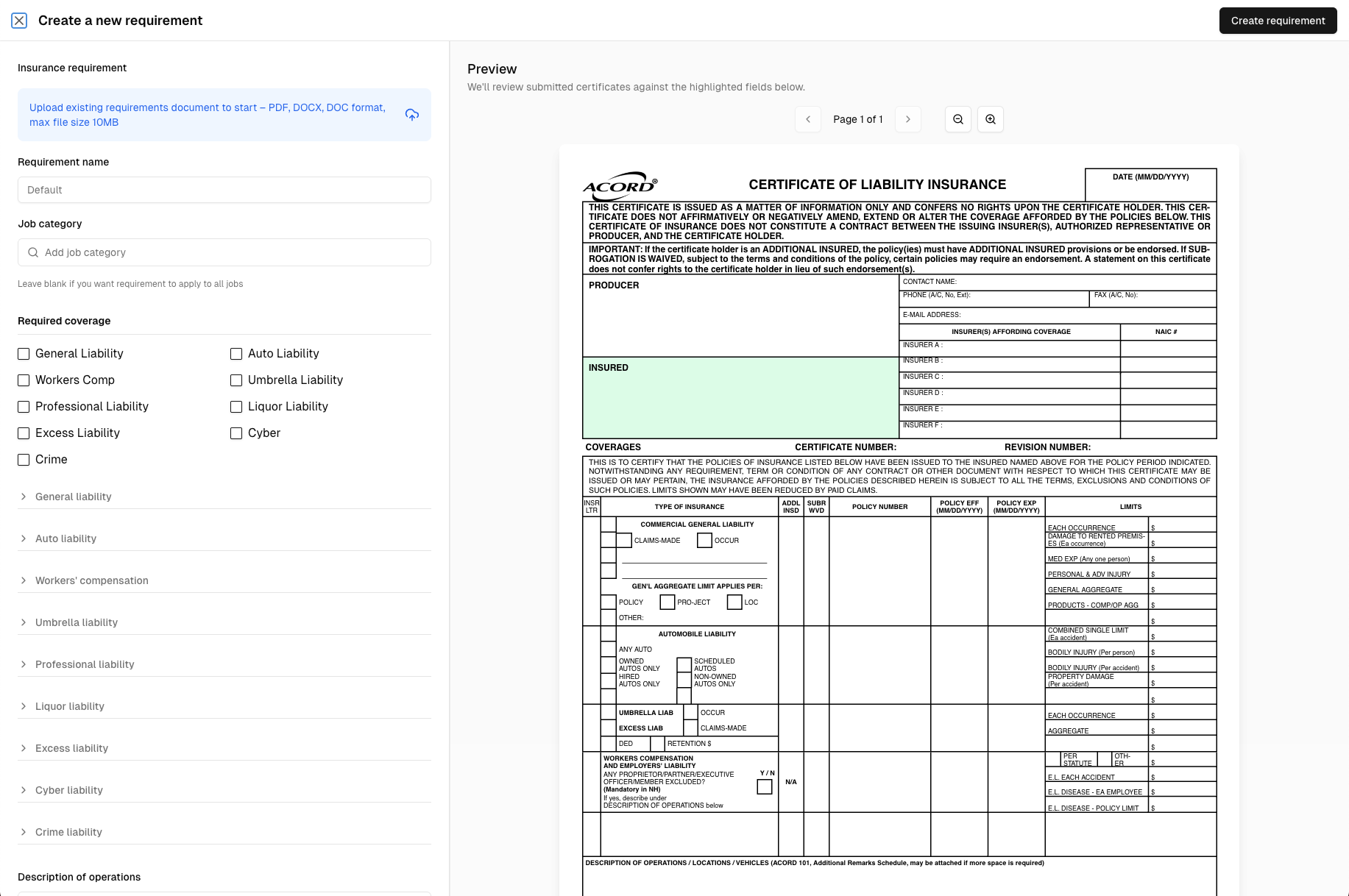
- Navigate to Dashboard → Organization → Insurance Requirements
- Click Create Requirement
- Enter a name (e.g., "Standard Contractor Requirements" or "High-Risk Work Requirements")
- Add coverage rules (see below)
- Optionally associate with specific entities or job categories
- Save the requirement
Setting a default requirement
Every organization needs one default requirement. To set a default:
- Open the requirement in the Dashboard
- Toggle Set as default
- Save
Only one default can exist. Setting a new default automatically removes the previous one.

Associating with entities or job categories
You can assign requirements to specific entities or job categories when creating or editing the requirement. For example:
- A client entity with strict insurance requirements
- A "High-Risk Work" job category requiring higher limits
Supported coverage types
| Coverage type | Description |
|---|---|
| Commercial General Liability | Standard liability coverage for bodily injury, property damage, and personal injury |
| Workers' Compensation | Coverage for work-related injuries and employer's liability |
| Automobile Liability | Coverage for vehicles used in contracted work |
| Umbrella / Excess Liability | Additional liability limits above primary policies |
| Professional Liability (E&O) | Coverage for professional services errors and omissions |
| Cyber Liability | Coverage for data breaches and cyber incidents |
| Criminal Liability | Coverage for criminal defense costs |
| Liquor Liability | Coverage for alcohol-related incidents |
| Media Liability | Coverage for media and content-related claims |
Coverage rule fields
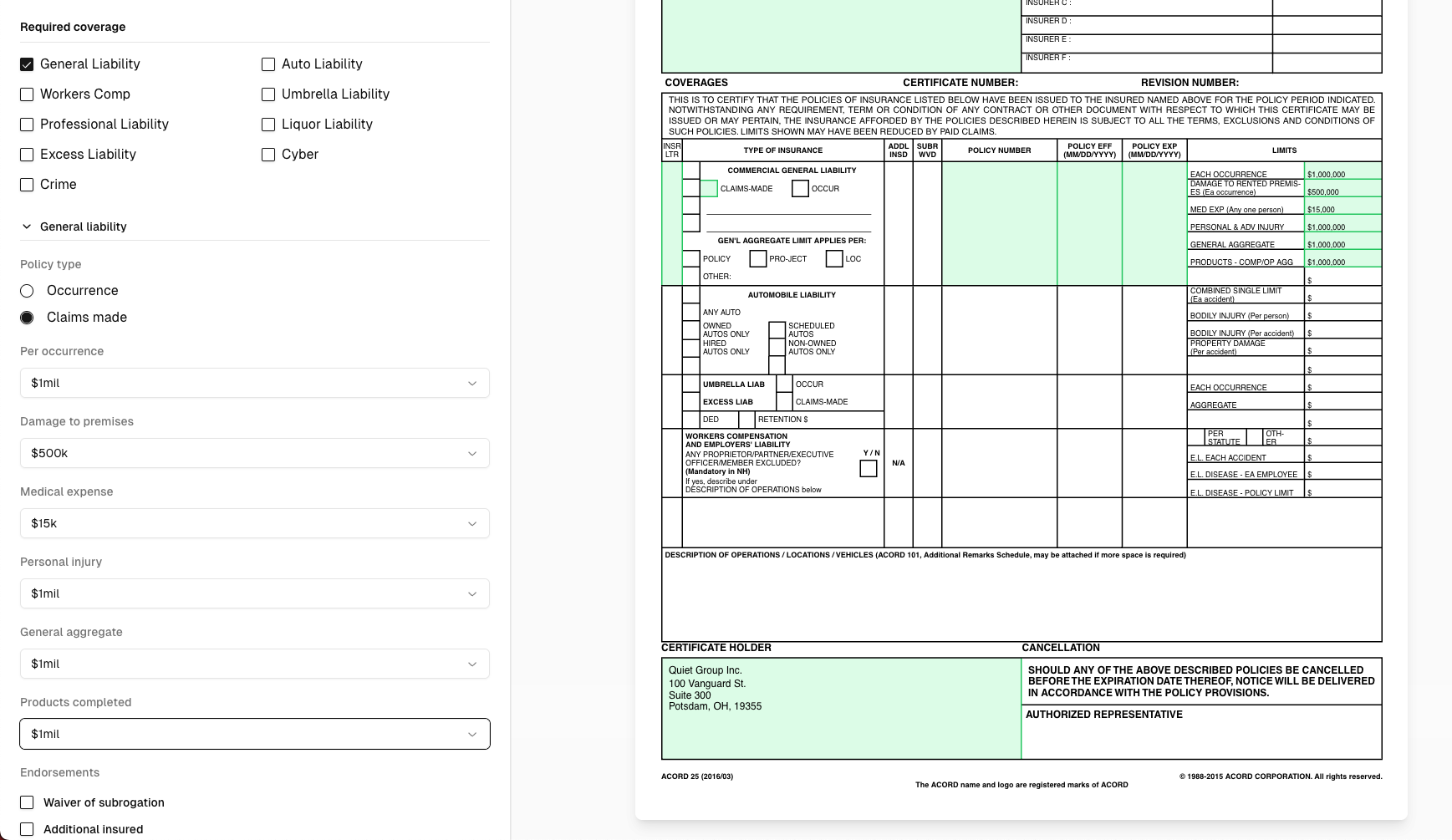
For each coverage type, you can validate multiple fields:
Commercial General Liability
| Field | Example rule |
|---|---|
| Per Occurrence limit | ≥ $1,000,000 |
| General Aggregate limit | ≥ $2,000,000 |
| Products/Completed Operations Aggregate | ≥ $2,000,000 |
| Personal & Advertising Injury | ≥ $1,000,000 |
| Damage to Rented Premises | ≥ $100,000 |
| Medical Expense | ≥ $5,000 |
| Policy expiration | Must be in the future |
| Additional Insured | Required |
| Waiver of Subrogation | Required |
Workers' Compensation
| Field | Example rule |
|---|---|
| Per Statute | Required |
| Each Accident | ≥ $1,000,000 |
| Disease per Employee | ≥ $1,000,000 |
| Disease Policy Limit | ≥ $1,000,000 |
| Policy expiration | Must be in the future |
When only Workers' Compensation coverage is required, additional insured validation in the description of operations is automatically skipped (not applicable to WC-only policies).
Automobile Liability
| Field | Example rule |
|---|---|
| Combined Single Limit | ≥ $1,000,000 |
| Bodily Injury per Person | ≥ $100,000 |
| Bodily Injury per Accident | ≥ $300,000 |
| Property Damage | ≥ $100,000 |
| Covered auto types | Any Auto, Hired, Non-Owned |
| Policy expiration | Must be in the future |
If you require split limits (e.g., Bodily Injury per Person ≥ $100K) but a certificate only shows a Combined Single Limit, the system will check whether the CSL meets or exceeds your requirement. This prevents false failures for certificates that use CSL formatting.
Umbrella / Excess Liability
| Field | Example rule |
|---|---|
| Each Occurrence | ≥ $5,000,000 |
| Aggregate | ≥ $5,000,000 |
| Policy expiration | Must be in the future |
Professional, Cyber, Criminal, Liquor, Media Liability
| Field | Example rule |
|---|---|
| Policy limit | ≥ $1,000,000 |
| Policy expiration | Must be in the future |
Special validation rules
Beyond coverage limits, you can require:
| Rule | What it checks |
|---|---|
| Certificate holder matches organization | The certificate holder name must match your organization's name |
| Insured name matches contractor | The named insured must match the contractor's name or company name |
| Additional insured required | Your organization is listed as an additional insured |
| Waiver of subrogation required | Waiver of subrogation is indicated on the certificate |
| Authorized representative signature | Certificate includes an authorized signature |
| Policy expiration in future | Policy must not be expired at time of review |
Date format requirements
The AI parser recognizes these date formats only:
MM/DD/YYYY(e.g., 01/15/2025)MM/DD/YY(e.g., 01/15/25)YYYY-MM-DD(e.g., 2025-01-15)
Certificates using other date formats may have expiration rules fail due to unparseable dates. If you're seeing unexpected failures on expiration checks, verify the certificate uses a supported format.
Next: Learn how to upload certificates for review.