
Overview
Instead of repeatedly calling the API to check certificate status, register a webhook endpoint to receive events automatically:
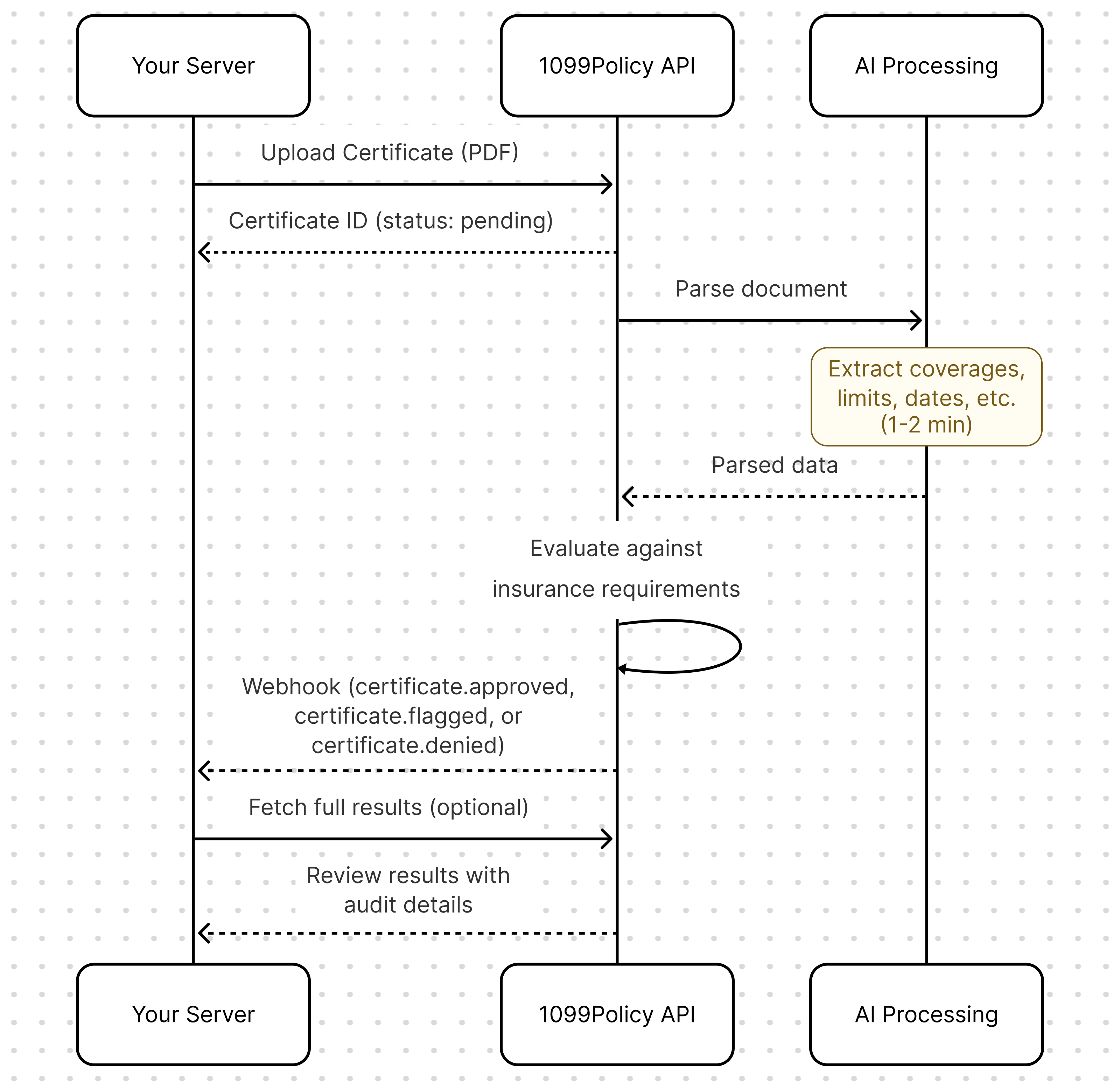
Available events
| Event | Triggered when |
|---|---|
certificate.approved | All requirements passed |
certificate.flagged | One or more requirements failed, needs manual review |
certificate.denied | Certificate was manually denied by a compliance reviewer |
certificate.error | Triggered when an error occurs during certificate processing |
Registering a webhook endpoint
Register your endpoint via the API:
curl https://api.1099policy.com/api/v1/webhook_endpoints \
  -u YOUR_SECRET_KEY: \
  -d url="https://your-app.com/webhooks/1099policy" \
  -d "events[]=certificate.approved" \
  -d "events[]=certificate.flagged" \
  -d "events[]=certificate.denied"
Response:
{
  "id": "we_abc123",
  "url": "https://your-app.com/webhooks/1099policy",
  "events": [
    "certificate.approved",
    "certificate.flagged",
    "certificate.denied"
  ],
  "secret": "whsec_xxxxxxxxxxxxxxxxxxxxxxxx",
  "created": 1706745600
}
Save the secret value. You'll need it to verify webhook signatures. The secret is also available in your Dashboard under the Webhooks tab.
Event payload
When an event fires, we send a POST request to your endpoint:
{
  "id": "evt_abc123",
  "type": "certificate.flagged",
  "created": 1706745620,
  "data": {
    "object": {
      "id": "cert_aBcDeFgHiJ",
      "contractor": "cn_abc123",
      "status": "flagged",
      "created": 1706745600
    }
  }
}
Payload fields
| Field | Description |
|---|---|
id | Unique event identifier |
type | Event type (e.g., certificate.approved) |
created | Unix timestamp of when the event was created |
data.object | The certificate object that triggered the event |
The data.object contains basic certificate information. To get full details including review results, make a follow-up API call:
curl "https://api.1099policy.com/api/v1/files/certificates/cert_aBcDeFgHiJ?expand[]=review_results.full" \
  -u YOUR_SECRET_KEY:
Handling webhooks
Here's a complete example of a webhook handler:
from flask import Flask, request, jsonify
import hmac
import hashlib
import requests

app = Flask(__name__)

WEBHOOK_SECRET = 'whsec_xxxxxxxxxxxxxxxxxxxxxxxx'
API_SECRET_KEY = 'YOUR_SECRET_KEY'

@app.route('/webhooks/1099policy', methods=['POST'])
def handle_webhook():
    # 1. Verify signature
    payload = request.get_data(as_text=True)
    signature = request.headers.get('x-convoy-signature')
    timestamp = request.headers.get('convoy-timestamp')

    if not verify_signature(payload, timestamp, signature, WEBHOOK_SECRET):
        return jsonify({'error': 'Invalid signature'}), 401

    # 2. Parse event
    event = request.json
    event_type = event['type']
    certificate = event['data']['object']

    # 3. Handle by event type
    if event_type == 'certificate.approved':
        handle_approved(certificate)

    elif event_type == 'certificate.flagged':
        handle_flagged(certificate)

    elif event_type == 'certificate.denied':
        handle_denied(certificate)

    # 4. Acknowledge receipt
    return jsonify({'received': True}), 200


def verify_signature(payload, timestamp, signature, secret):
    request_data = f'{timestamp},{payload}'
    expected = hmac.new(
        secret.encode(),
        request_data.encode(),
        hashlib.sha512
    ).hexdigest()
    return hmac.compare_digest(expected, signature)


def handle_approved(certificate):
    contractor_id = certificate['contractor']
    # Contractor is cleared - proceed with onboarding
    activate_contractor(contractor_id)


def handle_flagged(certificate):
    # Fetch full results to see what failed
    response = requests.get(
        f"https://api.1099policy.com/api/v1/files/certificates/{certificate['id']}?expand[]=review_results.full",
        auth=(API_SECRET_KEY, '')
    )
    full_certificate = response.json()

    # Queue for compliance team review
    queue_for_review(full_certificate)


def handle_denied(certificate):
    contractor_id = certificate['contractor']
    # Notify contractor they need new coverage
    send_denial_notification(contractor_id)
Verifying signatures
Always verify webhook signatures to ensure requests are from 1099Policy, not a malicious actor.
The signature is sent in the x-convoy-signature header. To verify:
- Get the
convoy-timestampheader value - Concatenate the timestamp and request body with a comma:
{timestamp},{payload} - Compute the HMAC-SHA512 hex digest using your webhook secret
- Compare with the
x-convoy-signatureheader value
Python
import hmac
import hashlib

def verify_signature(payload, timestamp, signature, secret):
    request_data = f'{timestamp},{payload}'
    expected = hmac.new(
        secret.encode(),
        request_data.encode(),
        hashlib.sha512
    ).hexdigest()
    return hmac.compare_digest(expected, signature)

# Usage
payload = request.get_data(as_text=True)
timestamp = request.headers.get('convoy-timestamp')
signature = request.headers.get('x-convoy-signature')

if verify_signature(payload, timestamp, signature, WEBHOOK_SECRET):
    # Valid request from 1099Policy
    process_event(request.json)
Node.js
const crypto = require('crypto');

function verifySignature(payload, timestamp, signature, secret) {
  const requestData = `${timestamp},${payload}`;
  const expected = crypto
    .createHmac('sha512', secret)
    .update(requestData)
    .digest('hex');
  return crypto.timingSafeEqual(
    Buffer.from(expected),
    Buffer.from(signature)
  );
}

// Usage
const payload = req.body; // raw body string
const timestamp = req.headers['convoy-timestamp'];
const signature = req.headers['x-convoy-signature'];

if (verifySignature(payload, timestamp, signature, WEBHOOK_SECRET)) {
  // Valid request from 1099Policy
  processEvent(JSON.parse(payload));
}
Use constant-time comparison functions (hmac.compare_digest in Python, crypto.timingSafeEqual in Node.js) to prevent timing attacks.
Responding to webhooks
Your endpoint should:
- Return 2xx quickly — Respond within 30 seconds to acknowledge receipt
- Process asynchronously — Queue heavy work (database updates, notifications) for background processing
- Be idempotent — The same event may be delivered more than once; handle duplicates gracefully
Example: Async processing with a task queue
@app.route('/webhooks/1099policy', methods=['POST'])
def handle_webhook():
    # Verify signature...

    event = request.json

    # Queue for async processing
    task_queue.enqueue(process_certificate_event, event)

    # Return immediately
    return jsonify({'received': True}), 200
Retry behavior
If your endpoint returns a non-2xx status code or times out, we retry delivery with exponential backoff. After multiple failed attempts, the webhook is marked as failed.
To avoid missed events:
- Return 2xx even if you encounter an error processing the event (log the error and handle it separately)
- Implement a fallback that periodically checks for certificates in
pendingorprocessingstatus that may have been missed
Managing webhook endpoints
List all endpoints
curl https://api.1099policy.com/api/v1/webhook_endpoints \
  -u YOUR_SECRET_KEY:
Update an endpoint
curl -X PUT https://api.1099policy.com/api/v1/webhook_endpoints/we_abc123 \
  -u YOUR_SECRET_KEY: \
  -d url="https://your-app.com/webhooks/new-path" \
  -d "events[]=certificate.approved" \
  -d "events[]=certificate.flagged"
Delete an endpoint:
curl -X DELETE https://api.1099policy.com/api/v1/webhook_endpoints/we_abc123 \
  -u YOUR_SECRET_KEY:
Testing webhooks locally
During development, use a tunneling service to expose your local server:
- Start your local server (e.g., on port 5000)
- Use a tool like ngrok to create a public URL:bash
ngrok http 5000 - Register the ngrok URL as your webhook endpoint:bash
curl https://api.1099policy.com/api/v1/webhook_endpoints \ -u YOUR_SECRET_KEY: \ -d url="https://abc123.ngrok.io/webhooks/1099policy" \ -d "events[]=certificate.approved" \ -d "events[]=certificate.flagged" \ -d "events[]=certificate.denied" - Upload a test certificate and watch for the webhook
Next: Learn how to handle edge cases and troubleshooting scenarios.